What Load Testing with k6 Caught Before Our Biggest Traffic Day of the Year
PrizePicks is a skill-based fantasy platform where users build and submit picks against player and game outcomes, and right now is our busiest season of the year: NFL SZN.
Every year before a major traffic event, like NFL kickoff or the Super Bowl, we run a suite of load tests to make sure our systems hold up under the load we expect. This year, one of those tests turned up several issues, but the headline finding was a shared, third-party service we depend on that couldn't handle the traffic we were about to send its way, and testing that limit ended up causing a real incident on our own production app in the process. Here's everything it found, what we did about it, and what we'd change next time.
How We Load Test
As the team behind the social feed, our load testing scenarios covered the APIs that provide the feed activities, including the lineups, reactions, and profile information attached to each activity. We also cover the APIs for statistics and lineups provided on the Profiles tab.
The traffic numbers are provided by our platform and infrastructure teams based on what is projected for the upcoming event. We set our stages, including target virtual users (VUs) and the duration of each stage, based on the level of traffic we expect to see at different stages of the main event.
The test configuration also allows us to enable and disable some of the test actions and to set how frequently they run. So if we want an endpoint hit 20% as often as the primary ones, we set it to 20% and the load spreads out accordingly.
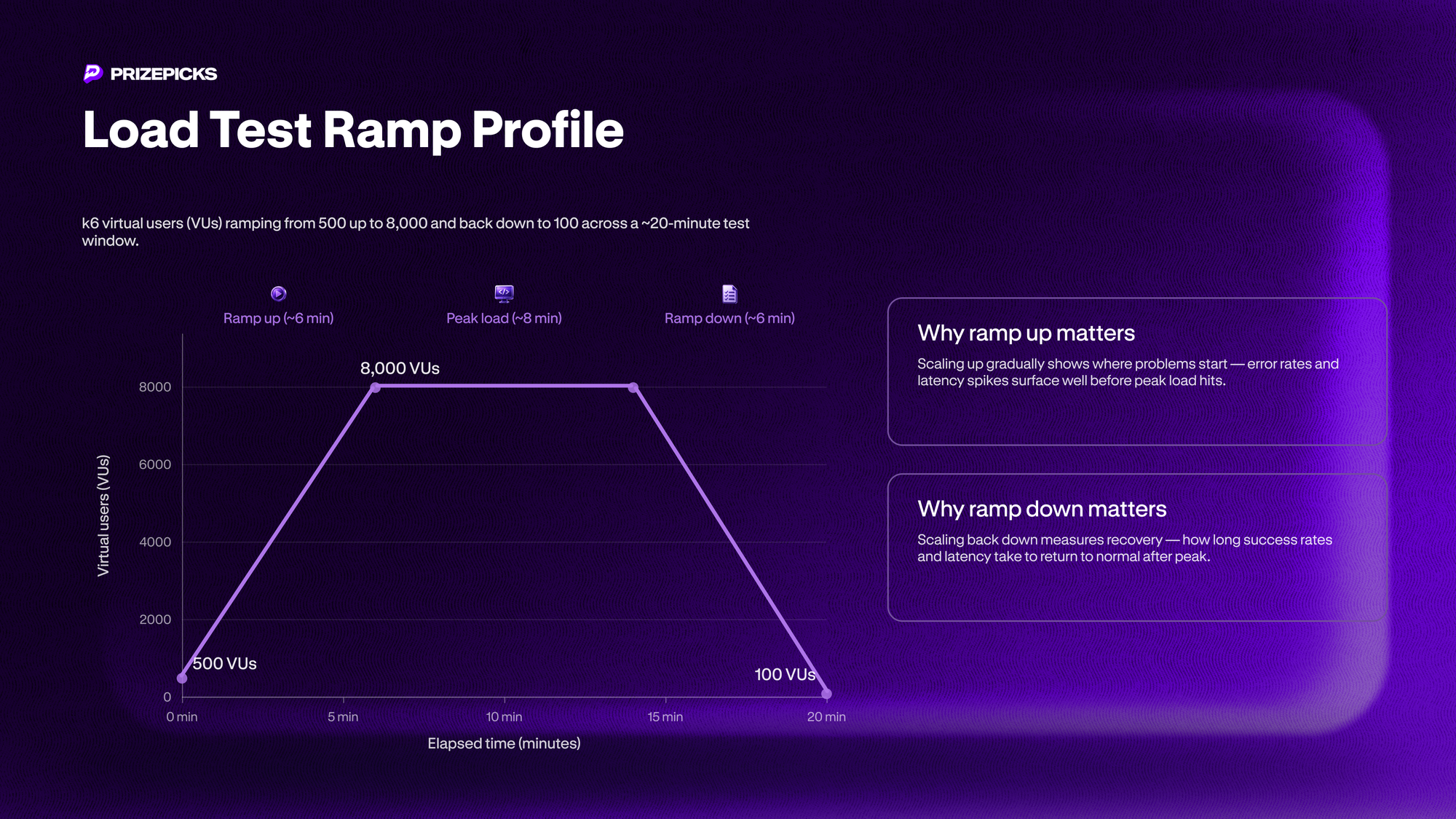
Our load test setup scales up from 500 virtual users (VUs) up to 8000 VUs then back down to 100 VUs and runs for about 20 minutes. It runs at its top load for about 8 minutes. Ramping up shows us where problems start. Ramping down shows us how long the system takes to recover.
k6 actions are written in JavaScript and run against a load test setup that mirrors our production setup. For some of PrizePicks’ functionality written and managed by the social group, we use a third party vendor.
When Your Load Test Reveals a Problem
When running the load tests, we’re typically looking for long response times, which indicate where webserver threads may get tied up and bring down services shared by that web server, or we’re looking for increased error rates, which occur when system resources or downstream services like the databases or third party services are struggling.
79% Error Rate
One of the first issues the load test raised was a 79% error rate on one of our endpoints. While the number was alarming, it was driven by us hitting the rate limit for the corresponding third party endpoint.
The cause was a combination of two things: the rate limit on the vendor’s end and a 100% frequency setting on our endpoint that didn’t reflect the traffic projections for the Super Bowl.
Increased Latency
The load test also surfaced a latency spike on one of our endpoints, where p95 response time reached 1.23 seconds, well past the 300ms SLO we'd set for that endpoint.
Separately, p99 latency across several read endpoints was running close to 3 seconds, which lined up with the client-side timeout we had configured for calls to the vendor. Some of what looked like errors there were really timeouts firing on requests that just needed a bit more time.
Collateral Damage
While we were running the load test, our own production app started throwing alerts too. Success rates dipped and latency climbed for about 10 to 20 minutes, and the timing lined up exactly with our test window. We were sharing infrastructure with the vendor's other customers, so load we generated on their side spilled over into real traffic on ours. This wasn't the system failing under simulated load. It was our test becoming somebody's live incident, ours included.
Fixing the Issues
In most of these cases, we worked with our vendor to solve these problems. Our team meets with them every 2 weeks. We increased that cadence heading into the Super Bowl.
Increasing Vendor Rate Limits
For our 79% error rate, the vendor increased the rate limit and we evaluated the rate limits for the production endpoints to make sure this wouldn’t be a problem during the Super Bowl. The frequency setting in the load test sent 100 times the load needed for that endpoint. We reduced it to 1%.
Our vendor initially pushed back on the increased rate limit because our instances of their service ran on the same systems as other customers. Their concern was impact on their other customers. Given the performance incident from the load test that surfaced in production, that concern was fair. Eventually they increased the rate limit to meet our traffic needs.
Increasing Timeouts
We raised the numbers with the vendor directly, and it factored into the decision afterward to bump our client timeout from 3s to 5s. That 3-second figure was just a default, not a carefully chosen limit. Prioritizing a working system over it gave us a clearer picture of the actual shape of our performance and a real baseline to optimize the endpoint from, instead of a hard ceiling that just added to our error count.
Scaling Vendor Capacity
Once we understood the impact of the expected traffic on the shared shard the vendor had our service deployed to, the vendor doubled the database capacity on that shard. A few days later, after we synced directly with their team, they scaled the database up again and increased connection pool capacity too, to handle the increased load from the Super Bowl without impacting other tenants on the same shard.
Adding a Cache TTL
Our vendor also added a 30 second TTL edge cache on one of their endpoints that we use, which had been serving every request live up to that point. This cut down on the vendor recomputing that feed from scratch on every request, for one of our highest-traffic read paths.
Adding Kill Switches
Finally, we added kill switches, implemented as feature flags, in the code paths where the load test exposed risk, so a failure there wouldn't cascade into a wider outage. One switch let us stop writing new activity posts to the vendor entirely, in case write traffic became a bottleneck. A second let us disable the feed outright, in case reads became unstable, without taking down any other part of the app. That gave us a fallback if our fixes, or the vendor's, didn't fully solve things before the Super Bowl.
Takeaways / Next Steps
- Rate limits, not raw throughput, turned out to be the real ceiling on a shared vendor instance. A passed load test doesn't automatically mean the infrastructure is fine.
- Load testing against shared third-party infrastructure can cause production impact on its own. Plan for that risk if you're designing a similar test.
- Longer-term fix in motion: migrating to a dedicated (non-shared) vendor instance, and evaluating which functionality and data we could move into our own server clusters instead, alongside the rest of our infrastructure.
- We want load testing to be more continuous and automated, and drift between the load-test environment and prod is still a gap we need to close.
- A solid working relationship with your vendors pays off when things go sideways. Worth investing in before you need it.
- We run load tests outside of Super Bowl prep too. Those issues are often in our own code or backend infrastructure rather than a vendor's, and fixing them comes down to involving the right people internally.
- Beyond this specific vendor issue, many improvements surfaced by load tests since the Super Bowl involve eliminating unneeded queries, adding database indexes, and pre-calculating and caching values for endpoints.
And if you are a free agent looking to get drafted to an Engineering team that solves real world problems like this in-house, come build with us.
Continue to keep up with us here on how we're threading the needle between the DFS industry and innovation.